Haydn Cowley

Haydn Cowley

Applying for Level 6 cyber security degree apprenticeships for 2027.

My 10 inch rack from the side: a black frame with two carry handles and a smoked glass side panel. The Raspberry Pi's ports show at the top front, with two short cables looping out to the switch below.

Computers around the world try to break into this website every day. My firewall rules stop them before they reach the Pi it runs on.

From my Cloudflare firewall log. It never shows IP addresses.

I’m an IT student in West Yorkshire. To learn cyber security properly, I built a small network in a rack at home: a Raspberry Pi running my own DNS, VPN, honeypot and this website, with no ports open on my router. Then I attacked it from Kali Linux to check it held, and wrote up everything, including what went wrong.

Based in
West Yorkshire
Studying
Cambridge Technical in IT (Double), working at D*D*
GCSEs
Maths 6, English 5
Extended project
Does AI help attackers or defenders more? Working at A

The rack in the photoBuilt 14 to 20 October 2026. It’s serving this page right now.Checking the lab…

One Raspberry Pi, set up like a small company network

A Raspberry Pi 5, a managed switch and a 1TB drive in a 10 inch rack, about £240 of parts. I chose every part, built the rack and set up every service on it.

The front of my rack. The Raspberry Pi's ports sit in the top panel next to an empty slot for a second Pi. Below it, the 1TB drive rests on top of the TP-Link switch, with cables in ports 1 to 3. Then a blank panel and open space at the bottom.
U1
Raspberry Pi 5, 2GB, in a KKSB panel. It runs every service, and there’s a spare slot for a second Pi.Up for --, CPU --
U2
TP-Link TL-SG105E, a 5-port managed switch, ready for VLANs. My WD My Passport 1TB sits on top for films and encrypted backups.Backup --
U3
Blank panel.
U4
Open space, for an SSD later.

Photo taken 20 October 2026. The readings come live from the Pi, and the lights show it’s online.

Protect

  • UFW firewall, deny by default
  • Fail2ban and CrowdSec
  • SSH with keys only
  • Automatic security updates

Detect

  • OpenCanary honeypot
  • Cloudflare blocked-request feed
  • Phone alerts with ntfy
  • Weekly Trivy CVE scan

Network

  • Pi-hole and Unbound, with DNSSEC
  • Tailscale VPN and exit node
  • Cloudflare Tunnel
  • Managed switch

Recover and run

  • Encrypted nightly backups
  • SD card health checks
  • Jellyfin, Homepage, Speedtest
  • Caddy web server

How this page reached you

  1. Your browserasked for haydnhomelab.com
  2. Cloudflarechecked the request against my firewall rules
  3. A tunnel the Pi openedoutgoing only, so nothing at home is open
  4. The Pi in the photosent you this page

The Pi connects out to Cloudflare, so my router has no ports forwarded. Cloudflare also blocks attack paths and floods before they reach my house. How it works

Four times I had to think on my feet

Four real problems from building my lab: what happened, what I did about it and how it turned out.

Vulnerability management and incident response

An NCSC warning, handled the same day

Situation
The NCSC warned about two critical PHP flaws that could let an attacker run their own code on a web server.
Task
Find out if anything on my Pi used PHP, and deal with it before it could be exploited.
Action
I checked each service instead of assuming. My site and Pi-hole don’t use PHP, but my Speedtest app’s container had PHP 8.5.11, from before the fix. No patched version was out yet, so I stopped it.
Result
The risk was gone the same day. When PHP 8.5.12 came out, I checked the new image’s version before starting it again.

A real attack, and reading the evidence

Spotting a real attack in my logs

Situation
The day I added a blocked-request feed to my live lab, it showed a burst of requests I hadn’t made.
Task
Work out what it was after, and whether my defences held.
Action
I went through the evidence: the paths (phpinfo.php, .env and .bak files), the timing (dozens in about 10 seconds) and the source, a rented cloud server pretending to be Chrome on Windows.
Result
My Cloudflare rule blocked every request, and my site has no PHP anyway. It was a textbook wordlist scan.

Vulnerability management and automation

Scanning my own apps: 2 critical down to 0

Situation
The PHP alert showed me that Docker apps carry their own software, which can quietly go out of date.
Task
Find vulnerable software myself, every week, without drowning in noise.
Action
I set up Trivy to scan every app each Monday, only counting high and critical problems that already have a fix, with the result sent to my phone.
Result
First scan: 2 critical, 15 high. After updating and scanning again: 0 critical, 6 high, which are waiting on the apps’ makers.

Cryptography and risk

Finding a weak spot in my own backups

Situation
My nightly backups held my VPN key, tunnel token and password hashes, unencrypted, on a USB drive.
Task
Keep them safe even if someone took the drive.
Action
I encrypted every backup with age. The Pi only has the public key, so it can lock backups but not open them. The private key stays on my Mac and in my password manager.
Result
A stolen drive is useless now. I proved a restore works (the SHA-256 hashes matched), then shredded the old unencrypted backup.

ATT&CK numbers are from MITRE ATT&CK, the shared list of attack techniques that security teams use.

Every claim, tested

I didn’t want to set things up and hope they worked, so I tested each part, usually by attacking it myself. Open a row to see the proof. Hostnames and IP addresses are hidden.

Only my SSH key can log inTried to force a password loginRefused

I turned off password logins so only my key works, stopped root logging in and only allowed my own user. I locked myself out once getting there, which taught me the right order: copy the key, check it works, then turn passwords off.

$ ssh -o PubkeyAuthentication=no haydn@<the pi>
haydn@<the pi>: Permission denied (publickey).
The firewall only shows what I openedScanned all 65,535 ports with Nmap4 open, the rest filtered

UFW blocks everything coming in unless I’ve allowed it. I scanned every port from another computer on my network. “Filtered” means the firewall drops the packet without replying, so a scanner can’t tell anything is there. This was before I added more services.

$ sudo nmap -p- <the pi>
Not shown: 65531 filtered tcp ports (no-response)
PORT    STATE SERVICE
22/tcp  open  ssh
53/tcp  open  domain
80/tcp  open  http
443/tcp open  https
Guess my password and you get bannedFive wrong logins from my Kali VMBanned for an hour

Fail2ban watches the login logs. Five wrong logins in ten minutes and that IP is banned in the firewall for an hour, and for longer each time it comes back. I attacked from my Kali Linux VM until it banned me, then unbanned myself.

  1. 1
  2. 2
  3. 3
  4. 4
  5. 5
  6. Banned in the firewall
Hardened with a security auditRan Lynis, fixed what made senseScore 63 to 75

Lynis checks hundreds of settings and scores them out of 100. I hardened SSH, kernel network settings and file permissions, and turned off protocols I don’t use. Two warnings were false positives, and I left some things on purpose, like a malware scanner that’s too heavy for a 2GB Pi.

Before63
After75
My website sends the right security headersScanned it on securityheaders.comF to A+

I added HSTS, a Content Security Policy and four more headers in Caddy. That got an A, capped because my page had code inside it, so I moved the code into its own file and blocked inline scripts completely. Then it got an A+.

Security Headers report: grade F, with Content-Security-Policy, X-Frame-Options, X-Content-Type-Options, Referrer-Policy and Permissions-Policy all missing.
Before, 18:40 UTC
Security Headers report: grade A+, with all six headers present, including Strict-Transport-Security.
After, 19:20 UTC the same day
Attack paths and POST requests get blockedAsked for wp-login.php and sent a POST with curl403 Forbidden

My Cloudflare rules block common attack paths (WordPress, PHP, .env, .git) and only allow GET and HEAD requests, so these never reach the Pi.

$ curl -s -o /dev/null -w "%{http_code}\n" https://haydnhomelab.com/wp-login.php
403
$ curl -s -o /dev/null -w "%{http_code}\n" -X POST https://haydnhomelab.com/
403
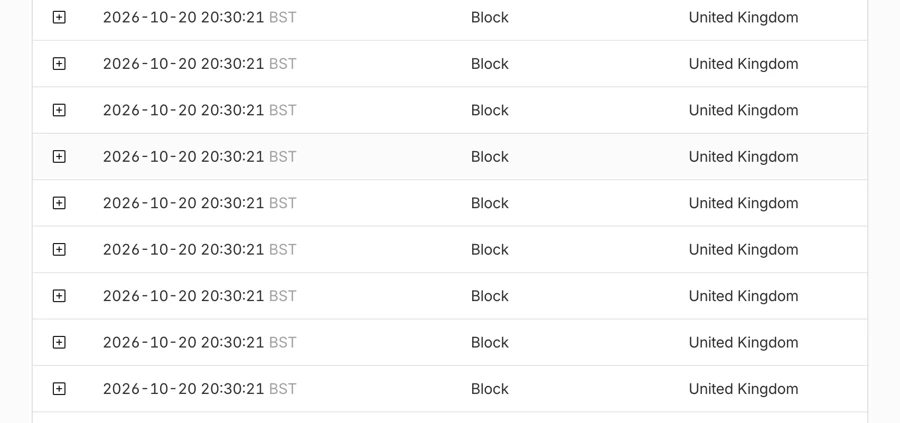
Floods get rate limitedSent 1,000 requests, 50 at a time785 blocked

More than 100 requests in 10 seconds from one IP gets blocked. My first version blocked nothing: I’d matched the path /, which only covers the homepage, and my test was hitting /stats.json. Changing it to /* fixed it.

785 blocked by my rate limit215 got through
Cloudflare's security events list: row after row of blocked requests from the United Kingdom, all at 20:30:21 on 20 October 2026.
Cloudflare’s log during the test: blocked over and over in the same second.
My DNS refuses faked answersLooked up a domain with broken signaturesRefused

Pi-hole blocks ads, trackers and known malware domains on my devices. Unbound looks websites up itself instead of telling one big company every site I visit, and checks DNSSEC, so a domain with deliberately broken signatures gets refused.

# a domain with deliberately broken signatures
$ dig fail01.dnssec.works @127.0.0.1 -p 5335
;; ->>HEADER<<- opcode: QUERY, status: SERVFAIL
# the same test site, signed properly
$ dig dnssec.works @127.0.0.1 -p 5335
;; ->>HEADER<<- opcode: QUERY, status: NOERROR
;; flags: qr rd ra ad
Anything poking around gets caughtHit the fake SSH and NAS login from KaliLogged straight away

OpenCanary pretends to be eight services that nothing should ever touch, so any connection is a warning sign. It runs as its own user in a locked-down sandbox, and since 27 October it alerts my phone. When I noticed what I typed into its fake login would show publicly, I changed the page to only show common attacker usernames.

  • Old SSH server2222
  • Telnet23
  • FTP21
  • MySQL3306
  • Remote Desktop3389
  • VNC5900
  • Redis6379
  • NAS login page8081
My backups can actually be restoredDecrypted one on my Mac and compared itSHA-256 matched

Every night the Pi backs up its settings, scripts, Jellyfin and Pi-hole to the 1TB drive, encrypted, and keeps the last 14. A backup is only useful if you can restore it, so I decrypted one on my Mac and compared it with the real file.

  1. The Pilocks each backup with the public key. It can’t unlock it.
  2. 1TB driveonly ever holds encrypted .age files.
  3. My Macunlocks it with the private key, which never touches the Pi.
  4. Checkthe SHA-256 of the restored firewall rules matched the Pi’s.
My apps get checked for known flawsTrivy scans every Docker image each MondayCritical 2 to 0

The first scan found 2 critical and 15 high in my Homepage and Speedtest images. Updating both brought it down to 0 critical and 6 high. The rest are waiting on the apps’ makers to release fixed versions.

No secrets in my code on GitHubgitleaks scans the whole history on every push0 found in 88 commits

A GitHub Actions workflow runs gitleaks on every push and every Monday, across every commit, not just the newest. To check it really catches things, Claude committed a fake token to a throwaway repo, and gitleaks flagged it.

Also running: CrowdSec intrusion prevention, automatic security updates, Tailscale with 2FA, ntfy phone alerts and a strict Content Security Policy on this site.

Matched to the apprenticeship standard

Level 6 cyber security apprenticeships are built on the Cyber Security Technical Professional standard (ST0409). Here’s where my lab work already lines up with its competencies.

Competency 5

Secure an operating system

Configure an Operating System in accordance with security policy.
  • SSH keys only, root login off, only my user allowed
  • Lynis audit: hardening score 63 to 75, and I checked what I skipped
  • Firewall denies everything coming in unless I allow it

Competency 2

Build and fix networks

Design, build, configure, optimise, test and troubleshoot simple and complex networks.
  • My own DNS (Pi-hole and Unbound), VPN (Tailscale) and a managed switch
  • Website online through a Cloudflare Tunnel with no open ports
  • Fixed a DNS record that only worked on my Mac

Competency 12

Find and fix vulnerabilities

Discover, identify and analyse threats, attack techniques, vulnerabilities and mitigations.
  • Weekly Trivy scan: 2 critical CVEs found and fixed the same day
  • NCSC PHP alert: found the one affected app and stopped it
  • Picked apart a real wordlist scanner from my logs

Competency 22

Monitor and detect intrusions

Security monitoring, analysis and intrusion detection. Recognise anomalies & behaviours.
  • A honeypot with eight fake services that alerts my phone
  • CrowdSec reading my logs, plus Cloudflare’s blocked-request feed
  • A live dashboard and a 90-day status page

Competency 18

Use security tech and keys

Configure and use security technology components and key management.
  • Backups encrypted with age: the Pi can lock them but not open them
  • Secret scanning (gitleaks) on every push to my GitHub
  • Security headers and a strict Content Security Policy

Competency 25

Test legally and ethically

Organise testing & investigation work in accordance with legal & ethical requirements.
  • I only ever test my own systems, and never scan attackers back
  • Public pages never show IP addresses or passwords
  • Every test is written up with what I ran and what happened

Behaviours

The standard asks for these too. Here’s my evidence.

A thorough approach
I test every change, then test again after fixing it. My rate limit only worked on the second try.
Calm under pressure
Dealt with an NCSC alert the same day, and a Cloudflare security notice the same night.
Clear writing
11 write-ups and a day-by-day build log, in plain English.
A security mindset
I attacked my own lab from Kali: port scans, password guessing and the honeypot.
Research
My EPQ asks whether AI helps attackers or defenders more.

My own mapping, using the competency wording from the ST0409 standard. Some employers use the Digital and Technology Solutions standard instead, which asks for the same kind of skills.

Checked against the UK’s baseline

Cyber Essentials is the NCSC’s scheme for the five controls every organisation should have. I checked my lab against version 3.3 to find my own gaps. It’s a self-check, not a certificate.

ControlMy labStatus
FirewallsBlock unauthenticated connections coming in by default.UFW drops anything I haven’t allowed, and my router has no ports forwarded. A full Nmap scan only found the ports I’d opened.Met
Secure configurationRemove what you don’t need, and stop password guessing.I switched off protocols I don’t use after a Lynis audit (63 to 75). Fail2ban bans an IP after 5 wrong logins, and Cyber Essentials allows up to 10.Met
Security update managementFix critical and high-risk vulnerabilities within 14 days.Automatic security updates, plus a weekly Trivy scan of my Docker apps. The NCSC PHP alert, Trivy’s critical results and Cloudflare’s certificate notice were all dealt with the same day.Met
User access controlOnly the right people, the least access, and MFA where you can.Only my user can log in, with my SSH key, and root login is off. My Tailscale account has 2FA, and the backups folder is root-only.Met
Malware protectionAnti-malware software, or only allowing approved apps to run.My Pi has neither. A malware scanner is too heavy for its 2GB of RAM, so instead Pi-hole blocks 851,589 domains, including known malware and phishing sites, and Trivy checks my apps. That’s my gap to close.Partly

How fast I patched

Cyber Essentials gives you 14 days to fix a critical or high-risk vulnerability.

  1. Cyber Essentials limit14 days
  2. NCSC PHP alert, containedsame day
  3. Trivy: 2 critical CVEssame day
  4. cloudflared certificatessame night

What I’d fix first

  • Malware protection. Application allow-listing would meet the control without needing a heavy scanner.
  • Network separation. Putting the lab on its own VLAN, so a problem there can’t reach the rest of the house.
  • Off-site backups. My encrypted backups sit on a drive next to the Pi. A copy somewhere else would follow the 3-2-1 rule.

Based on the NCSC’s Cyber Essentials requirements for IT infrastructure, v3.3.

Two weeks: build it, then defend it

The first week was building and testing. The second was what real security work looks like: alerts, a real attack, patching and one fault I caused myself. Every date is in my build log.

Week 1: build and test

From a box of parts to a hardened, tested lab.

  1. Ordered the parts. Made my SSH key and turned on 2FA for Tailscale.

  2. The rack arrived.

  3. First boot, and my first SSH problem to solve.

  4. Tests passedFirewall, automatic updates, Pi-hole, Tailscale and my first Nmap scans.

  5. Tests passedFitted the rack and put my dashboard online. Fail2ban tested from Kali, Lynis audit, Jellyfin.

  6. Tests passedHoneypot, encrypted backups, Unbound, security headers to A+ and Cloudflare firewall rules.

Week 2: monitor and respond

Real alerts, a real attack and patching against the clock.

  1. VulnerabilityNCSC PHP alert: found the one affected app and stopped it the same day. Added threat-intelligence blocklists.

  2. Real attackA wordlist scanner hunted for phpinfo.php and .env files. Every request was blocked. Added secret scanning: all 88 commits clean.

  3. VulnerabilityFirst Trivy scan found 2 critical CVEs, fixed the same day. Added CrowdSec and phone alerts.

  4. My own faultFound my phone alerts weren’t actually running: the schedule used an old copy of my script. Fixed it and wrote down why.

  5. Supply chainCloudflare warned that eight certificate keys could be worked out. The notice was checked against Cloudflare’s blog first, then I updated the same night.

Things that broke, and how I fixed them

I learned the most from things going wrong. These are the ones I’m proudest of working out.

What brokeWhyWhat I did
I locked myself out of the PiI’d copied my old SSH key to the Pi, then made a new one. With passwords off, nothing could log in.Reflashed it and did it in the right order: copy the key, check it works, then turn passwords off.
My site worked on my Mac but nowhere elseI’d typed “http” into Cloudflare’s subdomain box, so the record was http.haydnhomelab.com.Fixed the DNS record, then cleared the old answers my devices had saved.
My rate limit didn’t block anythingI’d matched the path /, which only covers the homepage.Changed it to /* and tested again: 785 of 1,000 requests blocked.
Cloudflare kept showing “bad gateway”Python’s simple web server couldn’t keep up with the page asking for new data every 3 seconds.Swapped it for Caddy, a proper web server.
My stats worked by hand but not on a scheduleCron runs with a short PATH that doesn’t include /usr/sbin, where ufw lives.Found it in the error log, then set the full PATH in the script.
My 1TB drive vanished after a restartThe USB storage driver hadn’t loaded, so Linux couldn’t see the drive at all.Loaded it with modprobe, then made it load on every boot.
The honeypot kept crashingIts start script uses sudo, and my sandbox blocks that on purpose.Ran it directly as its own user, so it doesn’t need root at all.
Lynis said I had no security updatesDebian 13 uses a newer sources format that this version of Lynis can’t read.Checked by hand. The updates were there, so it was a false positive.
I nearly put my own email on my public siteI’d typed it into the honeypot’s fake login while testing it.Changed the page to only show common attacker usernames.

What I can do, and what’s next

Everything here I’ve used in my own lab, with a write-up or build log entry to show for it. The dashed one is what I’m learning next.

Linux
Debian 13, systemd services, permissions, cron, logs, SSH
Networking
IP addressing, DNS and DHCP, ports, a managed switch, Tailscale VPN, Cloudflare Tunnel
Defence
UFW, Cloudflare WAF, rate limiting, Fail2ban, CrowdSec, Lynis hardening
Detection
OpenCanary honeypot, blocked-request analysis, CrowdSec alerts, ntfy alerting
Vulnerabilities
Trivy, CVE triage, NCSC alerts, patching, Nmap, Kali Linux
Crypto and secrets
age encryption, SSH keys, gitleaks, GitHub Actions, DNSSEC
Web and tools
HTTPS, security headers, CSP, Caddy, Docker Compose, Git

How I used AI

Knowing how to use AI well, and when not to trust it, is part of the job now. So here’s exactly how I used it.

I used Claude, an AI assistant, like a tutor while building this. It explained how things work, gave me the commands to run and wrote the code for my websites, including this page.

Claude did

  • Wrote the code and scripts
  • Explained each step
  • Helped me write things up

I did

  • Chose and built the hardware
  • Ran every command on the Pi
  • Tested it and made the decisions

Testing is what makes it work. My rate limit looked right but blocked nothing until I tested it. And when my phone alerts quietly weren’t running, it was checking the live site that showed something was wrong.

“Is AI a defence mechanism or a tool that is used to weaponize a cyber-attack?”
My Cyber EPQ question, City & Guilds. The essay and presentation are due in March 2027.

Get in touch

I’m applying for Level 6 cyber security degree apprenticeships starting in 2027, and I’m based in West Yorkshire. If you’d like to talk, or ask me anything about the lab, I’d love to hear from you.